Super-Resolution Research · Part 5
Super-Resolution Research, Part 5: Building the Dataset Pipeline
How I generated 88,000 paired training images for SRCNN using sliding windows, SIFT keypoint filtering, and geometric consistency checks -- and the two bugs I shipped before getting it right.
Originally written 2022-08
SRCNN doesn’t train on full images. It trains on small patches — 33x33 pixel squares extracted from larger images, paired with their degraded low-resolution counterparts. The paper (Dong et al., 2014) describes this in about two sentences. Implementing it took me longer than implementing the model itself, which in retrospect should have been obvious: the model is three convolutions and two ReLUs, while the dataset pipeline involves image loading, dimension arithmetic, keypoint detection, geometric verification, cropping, resizing, metric computation, and file I/O for 88,000+ output files.
This post describes the pipeline I built during my CS 497 independent study in summer 2022. It went through three major versions before I stopped finding bugs in it.
Why Not Just Use Random Crops?
The naive approach to patch extraction is straightforward: slide a window across the image, extract every possible patch, pair each HR patch with its bicubic-downscaled LR counterpart, and dump them all to disk. This works. It also produces a lot of useless training data.
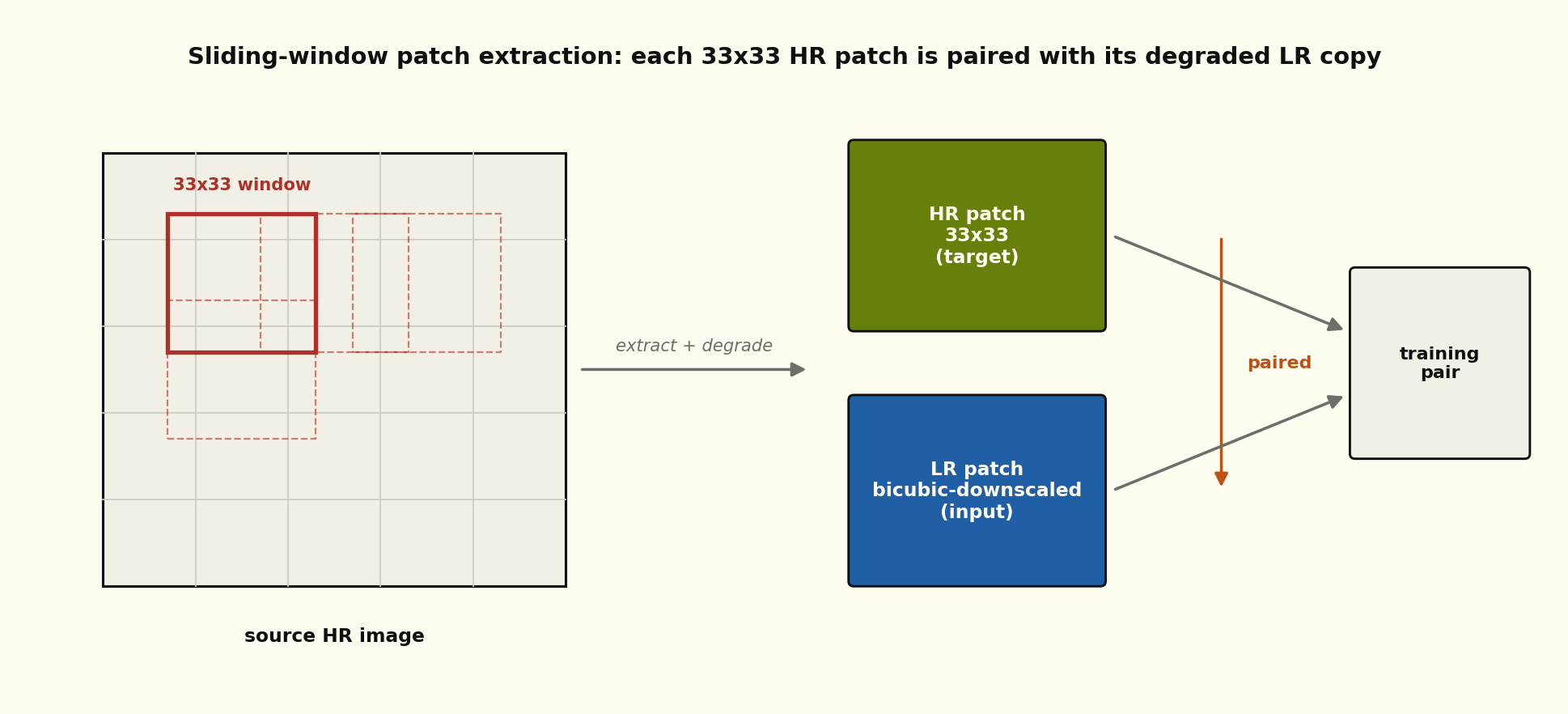
The window steps across the source image; every position yields one 33x33 HR patch and its bicubic-downscaled LR copy, and the two together form one training pair. The model never sees a full image during training, only thousands of these pairs.
Not all patches are equally useful for super-resolution training. A 33x33 patch from a flat sky region contains almost no texture — it’s nearly uniform pixel values, and the model learns nothing from it. A patch from a textured area (fur, brick, text, foliage) contains the kind of high-frequency detail that super-resolution models need to learn to reconstruct.
I needed a way to score patches by their visual complexity and filter out the boring ones. SIFT keypoints turned out to be a good proxy.
SIFT as a Texture Proxy
SIFT (Scale-Invariant Feature Transform) detects distinctive local features in images — corners, edges, blobs, textured regions. The number of SIFT keypoints in a patch correlates with the patch’s visual complexity. A flat sky patch might have zero keypoints; a patch of baboon fur might have forty.
def filter_patches_by_sift(patches, min_keypoints=10):
    sift = cv2.SIFT_create()
    filtered = []
    for patch, x, y in patches:
        gray = cv2.cvtColor(patch, cv2.COLOR_RGB2GRAY)
        kp = sift.detect(gray, None)
        if len(kp) >= min_keypoints:
            filtered.append((patch, x, y, len(kp)))
    return filtered
With min_keypoints=10, about 60-70% of patches survive filtering on a typical natural image. The rejected patches are exactly the ones you’d expect: sky, walls, out-of-focus backgrounds. The surviving patches contain edges, textures, and structures that give the super-resolution model something to work with.
Note
I tried using edge density (Canny edge count per pixel) as an alternative to SIFT keypoints. It was faster but coarser — it kept patches with strong edges but no texture detail, which turned out to be less useful for training. SIFT captures texture complexity, not just edge presence, which is what matters for SR.
The Full Pipeline: Version 2.5
The pipeline evolved through three iterations. Version 1 was a straightforward sliding window with no filtering. Version 2 added SIFT-based filtering. Version 2.5 fixed two bugs that I’ll describe below. The canonical pipeline works like this:
Step 1: Clean Dimensions
Super-resolution requires integer scale factors. If your image is 501 pixels wide and your scale factor is 4, the downscaled width would be 125.25 pixels, which doesn’t exist. The get_sizes function trims the image dimensions until they’re cleanly divisible:
def get_sizes(image_path, ratio):
    img = Image.open(image_path)
    image_width, image_height = img.size

    new_width = int(ratio * image_width)
    new_height = int(ratio * image_height)

    # Trim until dimensions divide cleanly
    while 1 / (image_width / new_width) != ratio:
        image_width -= 1
        new_width = int(ratio * image_width)

    while 1 / (image_height / new_height) != ratio:
        image_height -= 1
        new_height = int(ratio * image_height)

    return crop_needed, [image_width, image_height], [new_width, new_height]
This is the kind of code that looks like paranoia until you realize that a 1-pixel dimension mismatch between your HR and LR images silently corrupts your PSNR computation. I learned that lesson the hard way with a 501x334 image that produced NaN losses during training because the HR and LR patch dimensions didn’t match.
Step 2: Create the HR/LR Pair
The high-resolution image is loaded directly. The low-resolution image is created by bicubic downscaling:
good_image = cv2.cvtColor(cv2.imread(image_path), cv2.COLOR_BGR2RGB)
bad_image = make_resizer("PIL", True, "bicubic", (new_width, new_height))(good_image)
I used PIL for the downscaling step (with quantize_after=True) because that’s what I’d initially set up. In hindsight, I should have been more deliberate about this choice — as I documented in the library divergence post , the library choice affects training outcomes. But at the time, I didn’t know that yet. This pipeline is what led me to discover the problem.
Step 3: SIFT Match and Filter
Here’s where it gets interesting. Instead of just extracting patches from the HR image, the pipeline runs SIFT on both the HR and LR images, matches keypoints between them, and uses the matches to identify corresponding regions. This gives you geometrically aligned patches from both images, which is important when the downscale doesn’t preserve exact pixel alignment.
def get_match_info(good_image, bad_image):
    good_gray = cv2.cvtColor(good_image, cv2.COLOR_RGB2GRAY)
    bad_gray = cv2.cvtColor(bad_image, cv2.COLOR_RGB2GRAY)

    sift = cv2.SIFT_create()
    kp_good, desc_good = sift.detectAndCompute(good_gray, None)
    kp_bad, desc_bad = sift.detectAndCompute(bad_gray, None)

    bf = cv2.BFMatcher(cv2.NORM_L1, crossCheck=True)
    matches = bf.match(desc_good, desc_bad)
    return kp_good, desc_good, kp_bad, desc_bad, matches
Step 4: Geometric Consistency Check
Not all SIFT matches are correct. The remove_bad_matches function filters matches by checking whether the distance ratio between matched keypoint pairs is consistent with the known resize ratio. If the image was downscaled by 4x, matched keypoints should be 4x closer to the origin in the LR image. Matches that deviate by more than 5% are discarded.
def remove_bad_matches(good_kp, bad_kp, good_idx, bad_idx, ratio, error_margin=0.05):
    for i in range(len(good_idx)):
        dist_good = distance(0, 0, good_kp[i][0], good_kp[i][1])
        dist_bad = distance(0, 0, bad_kp[i][0], bad_kp[i][1])
        dist_ratio = (dist_good * ratio) / dist_bad
        if (1.0 - error_margin) < dist_ratio < (1.0 + error_margin):
            # keep match
This removes outlier matches that would produce misaligned patches. On a typical image, I’d start with 200-400 SIFT matches and end up with 150-300 after geometric filtering.
Step 5: Bounding Box Extraction and Cropping
The surviving keypoints define a bounding box on both the HR and LR images. The pipeline finds the four corner keypoints (closest to each corner of the convex hull), computes the inner bounding box, verifies that the coordinate ratios are consistent between HR and LR, and crops both images to their respective bounding boxes.
Step 6: Metrics and Save
Each pair gets its PSNR and SSIM computed before saving. The metrics serve as a sanity check — if a pair’s PSNR is anomalously low, something went wrong with the alignment. All pairs are saved as BMP files (lossless, no compression artifacts) along with a text metadata file recording dimensions and quality metrics.
The Two Bugs
BUG-020: SSIM Per-Channel
The original SSIM implementation computed the metric on the full 3-channel image as a single array instead of computing it per-channel and averaging. For RGB images, this is wrong — SSIM should be computed independently on each channel. The single-array computation mixes inter-channel information that SSIM’s formulation doesn’t account for.
The fix was straightforward:
def calculate_ssim(img1, img2):
    if img1.ndim == 3 and img1.shape[2] == 3:
        return np.mean([
            _ssim_single_channel(img1[:, :, i], img2[:, :, i])
            for i in range(3)
        ])
This matched MATLAB’s SSIM behavior, which computes per-channel and averages. The incorrect version was producing SSIM values that were plausible (0.85-0.95 range) but not reproducible against MATLAB’s output. It took me a while to catch because the numbers looked reasonable.
BUG-021: Missing Numpy Import
This one is embarrassing. The keypoint utility module used np.sqrt in the distance function but didn’t import numpy. It worked in the notebook environment (where numpy was already imported globally) but failed when I tried to use the module standalone. One missing import line, a silent failure in production.
Note
BUG-021 is the kind of bug that makes you question whether you should always run code outside of Jupyter before declaring it “done.” The answer is yes. Always.
The Output: 88,000 Pairs
Running the pipeline across DIV2K and Set14 produced 88,000+ paired BMP files. That’s 88,000 high-resolution patches and their degraded counterparts, each verified by SIFT matching and geometric consistency, each with quality metrics computed and logged.
The files are large (BMP is uncompressed), but that’s deliberate. PNG compression is lossy at the bit level for some implementations, and I didn’t want to introduce any compression artifacts into training data. When your research question is “why don’t my PSNR numbers match the paper,” the last thing you want is an additional source of disagreement hiding in your file format.
The entire dataset is regenerable from the source images using the pipeline. I regenerated it twice — once after fixing BUG-020 (to get correct SSIM values in the metadata) and once after fixing BUG-021 (to confirm the standalone module produced identical output to the notebook version). Both regenerations took about four hours on my machine, which isn’t fast but isn’t a crisis.
What I’d Do Differently
If I were building this again, I’d make three changes. First, I’d use a configurable output format (not hardcoded BMP). Second, I’d add progress bars — watching 88,000 files generate with only log messages for feedback was painful. Third, I’d parameterize the resize library from the start instead of hardcoding PIL. That last one would have saved me weeks of debugging downstream, because I would have noticed the library divergence immediately instead of discovering it months later.
The pipeline itself does what it’s supposed to do. It generates aligned, quality-filtered training pairs from arbitrary source images. The SIFT-based filtering genuinely improves training data quality — models trained on filtered patches converge faster than models trained on all patches, because they’re not wasting gradient updates on flat sky regions. And the geometric consistency check catches misaligned patches that would have introduced noise into the training signal.
Three versions, two bugs, four hours of regeneration time, and 88,000 files. That’s the dataset half of super-resolution from scratch.