Why Generic OCR Fails on Real-World Forms
Most OCR tools treat documents as flat images. Real-world forms have structure, hierarchy, and semantic relationships that require a fundamentally different approach.
Based on production experience at Darmis AI
What Generic OCR Actually Gives You
Every team I have worked with at Darmis arrives with the same story. They bought an OCR tool, fed it their insurance forms (or intake documents, or tax filings), and got back a wall of text with no structure. The accuracy number on the vendor’s marketing page was real. It was just measured on clean, typed, single-column documents, and a real-world ACORD application is nothing like that.
I want to walk through one specific case, because the abstract version of this problem never lands the way the concrete one does.
We onboarded a commercial insurance customer whose core document was the ACORD 125 — a multi-page commercial general liability application. They had already run it through a general-purpose OCR API and were frustrated, because the output was unusable downstream. Their accounting system needed clean field-value pairs, and what they had was a paragraph.
What Makes Forms Hard
The ACORD 125 is a good teacher because it breaks generic OCR in every way at once. It has nested tables where a single logical cell spans several printed rows. It has checkboxes whose state changes the meaning of the text right next to them — check “Auto” and the whole policy-type field means something different than if you check “Home.” It has calculation fields that reference other cells, multi-page continuations where a table opens on page 1 and closes on page 3, and handwritten annotations crammed into margins that no typed-document benchmark ever anticipated.
Generic OCR sees pixels. It reads left-to-right, top-to-bottom, and it has no concept of a “field,” a “row,” or the relationship between a checkbox and the label beside it. A human reads the form below in half a second — auto policy, deductible a thousand dollars — and the OCR API flattens it into a single run-on line.
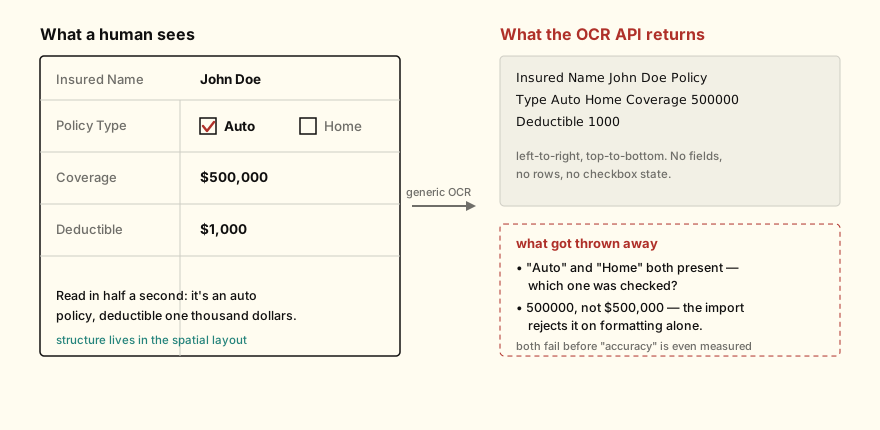
The same form, twice. A person reads the structure off the layout; the OCR API hands back a run-on line where the checkbox state and the dollar formatting have already been lost.
Look at what the flat string can’t answer. Both “Auto” and “Home” sit in the text, with no marker telling you which one was selected. What is the 1000 attached to? The structure that resolves those questions lives in the spatial layout, and that is exactly the part generic OCR throws away. (The customer’s downstream system, incidentally, rejected 500000 outright because it expected $500,000 — formatting alone broke the import before anyone even got to the checkbox problem.)
Three Ways to Attack It, and Why I Picked the Third
There are really three families of approach here, and I have shipped or torn out all three at one point or another.
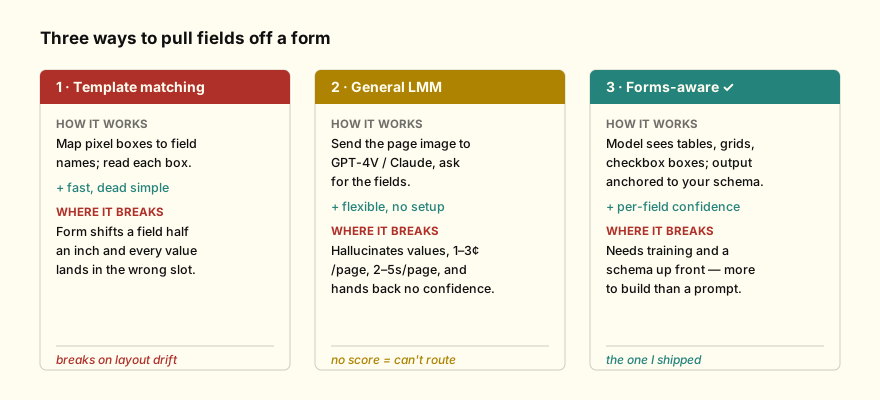
The three families at a glance, each with the failure mode that eventually pushed me off it. The first two are not strawmen — I ran both in production before landing on the third.
The first is template matching. You map pixel coordinates to field names and read whatever falls inside each box. It is fast and it is dead simple, and it works right up until someone scans a document two degrees rotated, or the form vendor moves a field. I have watched a production template pipeline break because a form was updated from version 2023.1 to 2023.2 with a single field shifted half an inch. Nobody changed our code. The form changed, and the code was pinned to pixels that no longer meant what they used to.
The second is sending the document image straight to a large multimodal model — GPT-4V or Claude — and asking it to extract the fields. This works surprisingly well on simple documents, and it fails in ways that are predictable once you have been burned a few times. It hallucinates: the model confidently returns a value that is not on the form. It is expensive at scale, somewhere around one to three cents per page, which sounds trivial until you are running ten thousand documents a day. It is slow, two to five seconds per page against milliseconds for a specialized model. And it hands you no confidence score, so you cannot tell the program which extractions to trust and which to route to a human. For a regulated customer, that last one is disqualifying on its own.
The third approach — the one we took at Darmis — is to train models that understand form semantics from the ground up. The model sees tables, grids, and spatial groupings rather than a flat text stream. Checkbox state becomes a binary classification on a bounding box. Every extracted value carries a reliability score. And the output is anchored to the customer’s expected schema instead of arbitrary text. The animating idea is that a form is not a document with text on it. It is structured data that happens to be encoded as an image, and the extraction problem is closer to parsing than to reading. Once I started treating it as parsing, the failures of the other two approaches stopped looking like bugs to fix and started looking like the wrong abstraction entirely.
What Held Up in Production
After running hundreds of thousands of real forms across insurance, healthcare, and government work, a few things turned out to matter far more than I expected going in, and one thing turned out to matter less.
The confidence score is the part I would fight hardest to keep. In a regulated industry you have to know which extractions to trust, and a system that is 99% accurate while silently failing on the other 1% is worse than a 95% system that flags its own uncertainty — because the silent failures are the ones that reach a claims adjuster, or an auditor, with nobody having looked at them. That ACORD 125 customer did not need perfect extraction. They needed to know which of the day’s three thousand documents to put a human on, and the confidence score is the entire mechanism for that.
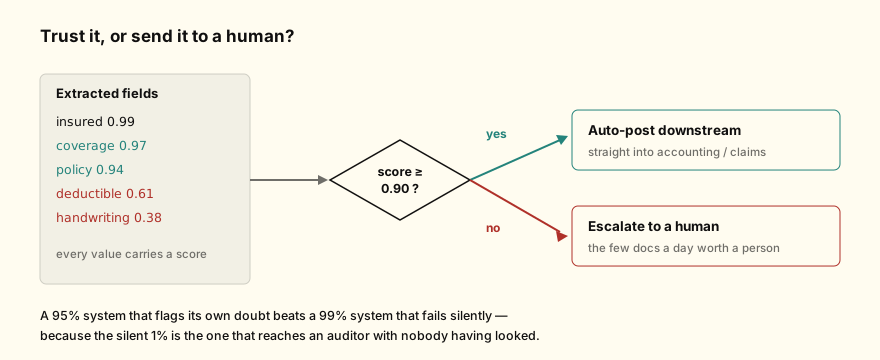
The score is not decoration — it is a routing decision. High-confidence fields post themselves; the low-confidence handful is exactly the work a person should be doing.
Schema turned out to matter more than raw accuracy, which surprised me. Extracting 500,000 versus $500,000 versus 500000 feels like a rounding error until the accounting system on the other end rejects the import, and then a “correct” extraction is worthless because it does not fit the slot it was meant to fill. Batch behavior mattered too: real workflows are thousands of documents a day moving through queues, webhooks, retries, and partial failures, and a model that is brilliant on one page and indifferent to backpressure does not survive contact with that volume. And privacy was never the constraint I initially filed it under. Healthcare and insurance documents are full of PII, customers need on-premise or VPC deployment, and their data cannot train shared models — that is not a box to check at the end, it is a property the architecture either has or does not.
Where I Land
I have built document processing the easy way and the hard way, and I no longer reach for a general-purpose tool and hope. The gap between “works on the demo” and “works on the forty-seventh variation of this form that someone scanned on a fax machine from 2003” is the whole job, and a model that respects the structure of the document is the only thing I have seen close it. Treat your forms as structured data, build or buy tooling that parses that structure instead of flattening it, and make every extraction tell you how much it trusts itself — because in this domain the extraction you cannot question is the one that hurts you.